WooCommerce Conversion Rate Optimization: The Definitive 2026 Playbook

WooCommerce conversion rate optimization is a data-driven framework for finding the exact points where shoppers give up — slow pages, cluttered checkouts, missing payment options — and fixing them so more visitors complete a purchase. Most stores pour money into PPC and email to fill the top of the funnel, then lose those buyers to a leaky bucket at the bottom.

The math is blunt. A store doing $500,000 a year at a 2% conversion rate earns an extra $250,000 from a single percentage point of improvement — with zero additional ad spend. This guide covers the full stack: database architecture, checkout design, payment methods, product pages, recovery automation, and testing.

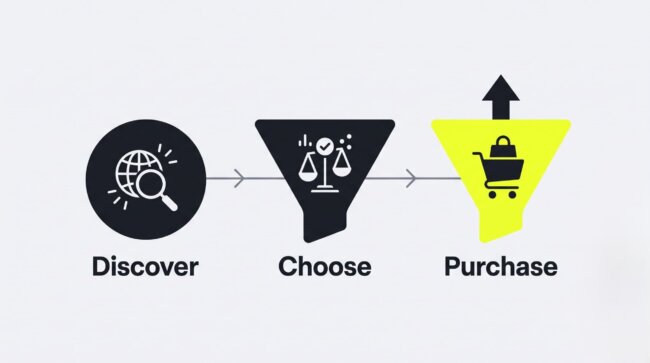
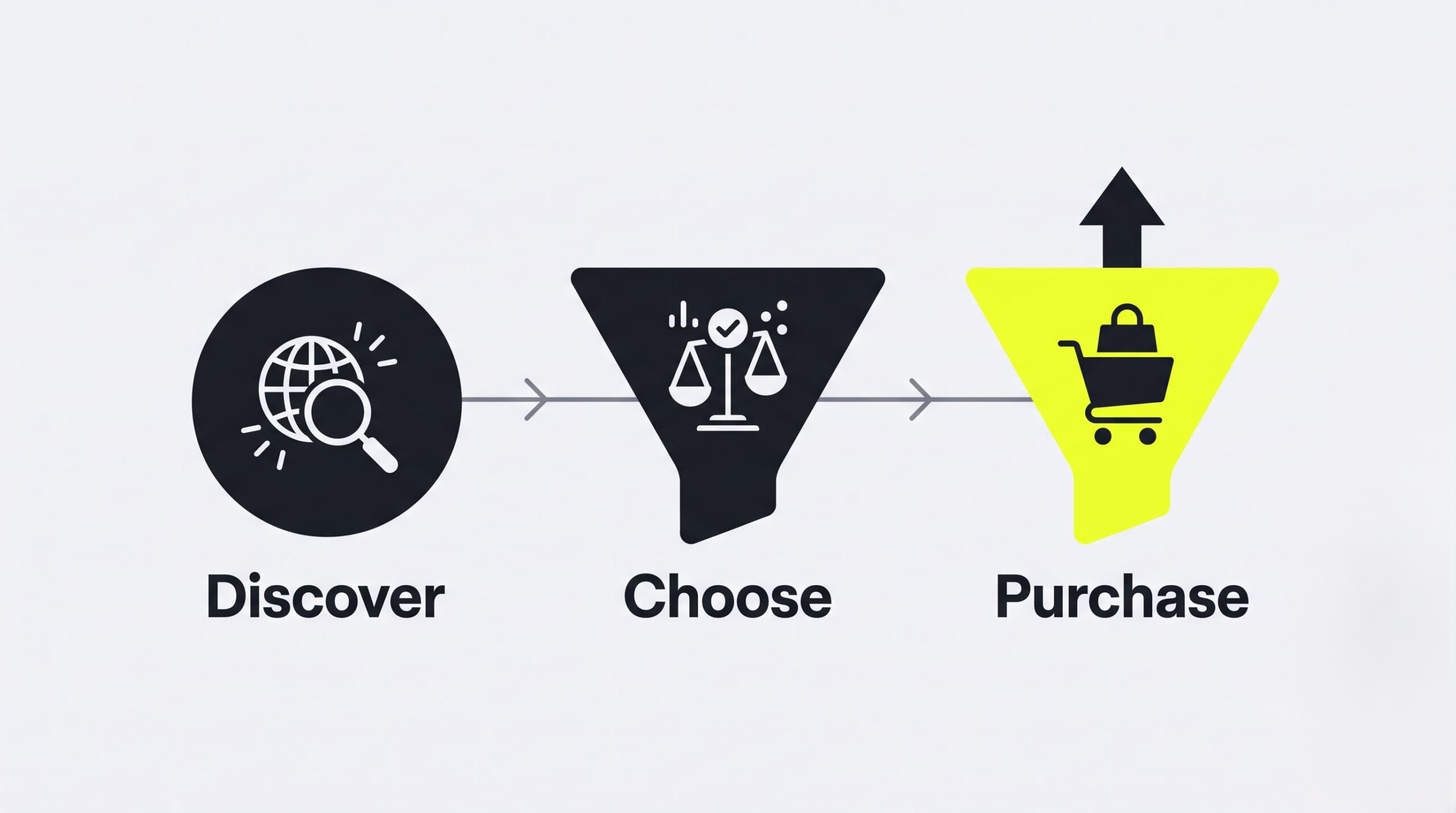
WooCommerce conversion rate optimization funnel showing discover, choose and purchase stages

Understanding WooCommerce Conversion Rate Optimization (CRO)

WooCommerce conversion optimization is the systematic process of improving how visitors interact with your store so more of them become paying customers. The work maps to three funnel stages — discovery, product selection, and purchase — and removes the technical and psychological barriers at each one, from slow page loads to bloated checkout forms.

Every WooCommerce funnel breaks down into three stages:

  • Discover — a visitor lands on your store through search, ads, email, or social.
  • Choose — the visitor evaluates a product page and decides whether to add to cart.
  • Purchase — the visitor completes checkout and pays.

Each handoff between stages leaks revenue. CRO plugs the leaks in order of impact.

The difference between guessing and optimizing comes down to evidence. “I think this button looks better” is a guess. “Version B converted 15% more visitors over 2,000 sessions” is a decision. Stores that treat WooCommerce conversion optimization as an ongoing measurement discipline — not a one-time redesign — compound small wins into large revenue gains.

For benchmarks: the average WooCommerce store converts between 2% and 4% of visitors. Top performers push well past that range, not through one dramatic change but through dozens of targeted fixes across speed, checkout, and trust.

If your store falls below these benchmarks, investing in professional ecommerce CRO services can help audit your funnel, find checkout leaks, and systematically boost sales.
Measuring the WooCommerce Sales Funnel: Key Metrics

Funnel measurement starts with connecting WooCommerce to Google Analytics 4 with Enhanced Ecommerce events, then tracking three numbers: cart abandonment rate, checkout completion rate, and product page conversion rate. Session recordings from Microsoft Clarity or Hotjar then explain why those numbers look the way they do.

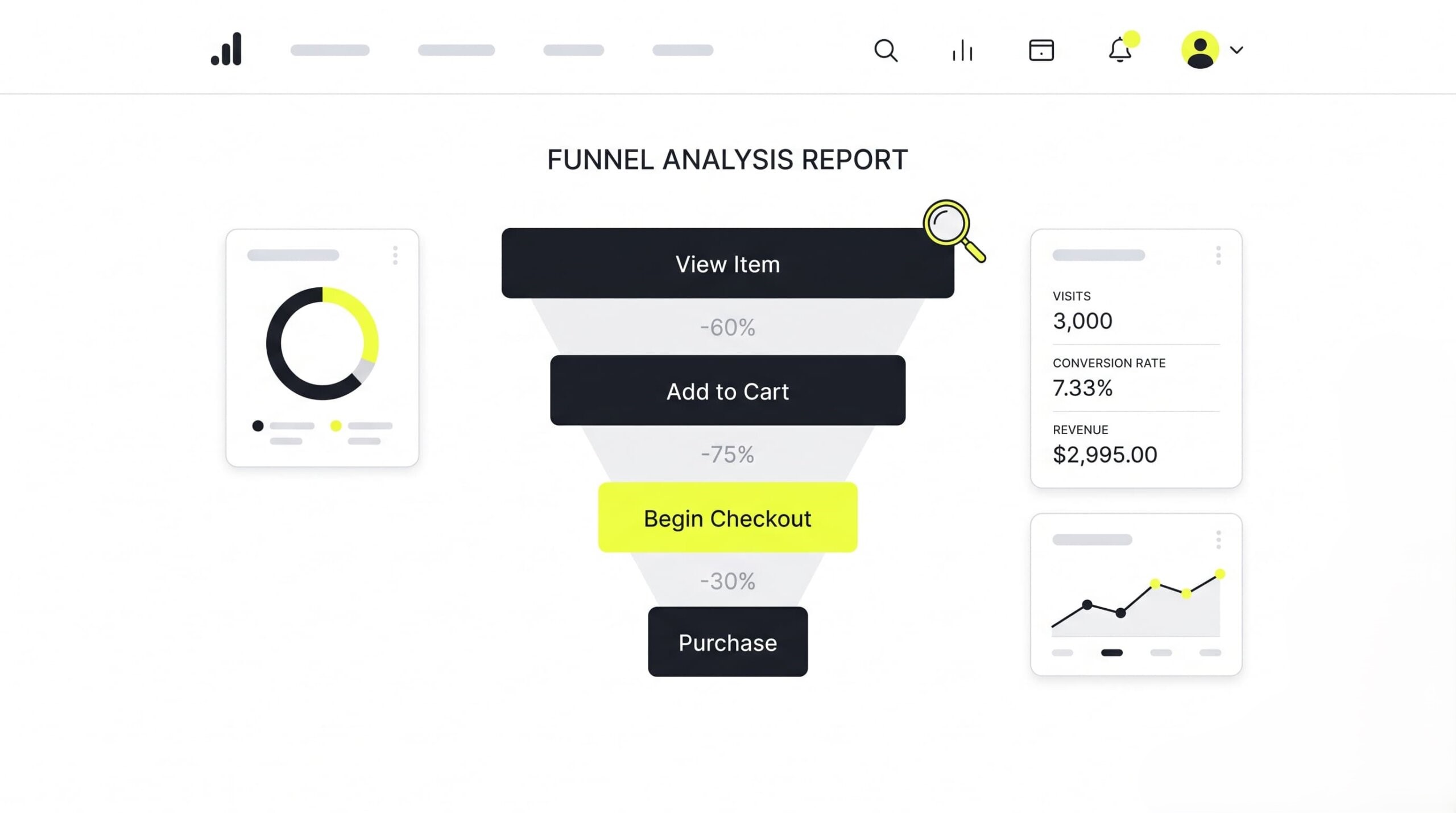
GA4 Enhanced Ecommerce tracks each funnel step as a discrete event: view_item, add_to_cart, begin_checkout, purchase. Once events flow in, build a Funnel Exploration report in GA4 to see exactly where visitors drop.

GA4 funnel exploration report tracking WooCommerce cart abandonment by checkout step

Watch three metrics above all:

  1. Cart abandonment rate — the share of carts that never reach checkout.
  2. Checkout completion rate — the share of started checkouts that end in payment.
  3. Product page conversion rate — add-to-carts divided by product page views.

Numbers show where people leave. Heatmaps and session recordings show why. Microsoft Clarity (free) and Hotjar record real sessions, exposing dead zones nobody scrolls to, rage clicks on broken elements, and form fields where users stall. Watch ten recordings of abandoned checkouts. You will find friction no analytics dashboard can name.

The Technical Foundation: Speed, Database, and Hosting

Technical performance sets the ceiling on every other conversion tactic. Research consistently shows that a one-second delay in page load can cut conversions by roughly 7%. Fast managed hosting, an optimized database structure, and aggressive caching form the mandatory first layer of any WooCommerce conversion rate optimization program.

Latency is a conversion killer. A shopper who waits three seconds for a product page has already started doubting the store; a shopper who waits five seconds on checkout has probably left. No headline, discount, or trust badge recovers a visitor who never saw the page render.

Hosting decides your baseline. Managed WordPress hosts built for WooCommerce — Pressable is a common choice — provide uptime guarantees and automatic scaling during traffic spikes, so a Black Friday email blast doesn’t crash the exact page it was supposed to monetize.

High-Performance Order Storage (HPOS) and Dedicated Database Tables

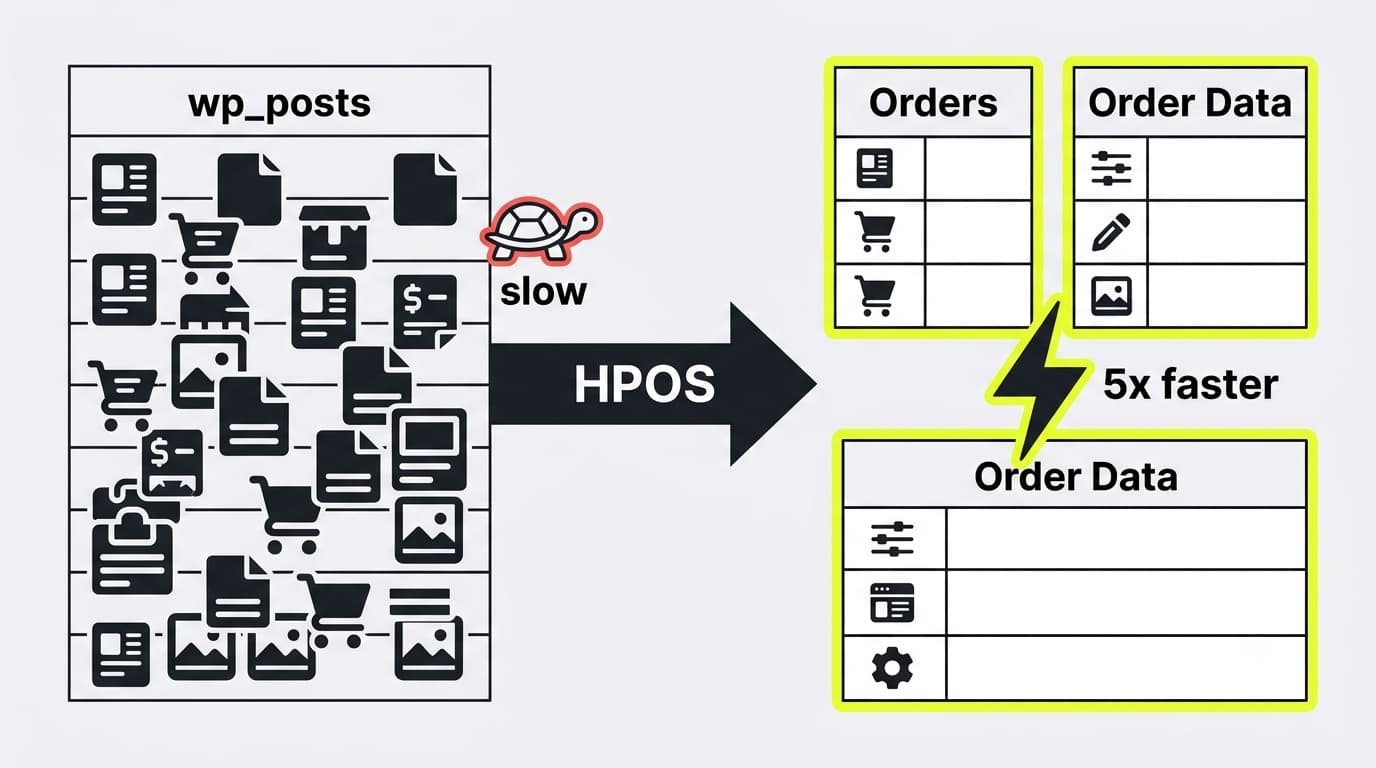
HPOS (High-Performance Order Storage) moves WooCommerce order data out of the generic WordPress posts tables and into dedicated e-commerce tables. The result, per WooCommerce’s own benchmarks: order creation runs up to 5x faster and checkout pages load about 1.5x faster, directly reducing drop-off at the most expensive moment in the funnel.

Here is the problem HPOS solves. Legacy WooCommerce stored every order in wp_posts and wp_postmeta — the same tables that hold blog posts, pages, and media. Call it the WooCommerce success paradox: the more you sell, the more those shared tables bloat, and the slower every database query becomes. Growth punishes the store.

HPOS diagram comparing legacy wp_posts storage with dedicated WooCommerce order tables

HPOS breaks the paradox. Orders live in purpose-built tables with proper indexes designed for transactional data. Queries touch only order data, not ten years of blog revisions. For stores past a few thousand orders, enabling HPOS (WooCommerce → Settings → Advanced → Features) is one of the highest-impact changes available — no redesign, no new plugins, just a faster checkout.

Caching, Image Compression, and Media Optimization

Page-level speed comes from three moves: full-page caching with WP Rocket or LiteSpeed Cache, converting product images to WebP with a tool like ShortPixel, and serving media through a CDN. Together these cut load times on image-heavy category and product pages, where most shopping decisions happen.

  • Caching. WP Rocket or LiteSpeed Cache serve pre-built HTML instead of regenerating each page per visit. Both handle WooCommerce correctly out of the box, excluding cart and checkout pages from the cache so dynamic data stays accurate.
  • Image compression. Product photography is usually the heaviest asset on the page. ShortPixel converts images to WebP, typically shrinking file size dramatically with no visible quality loss.
  • CDN. A content delivery network stores media on servers near your shoppers, so a buyer in Texas and a buyer in Oregon both get fast image loads instead of waiting on one distant origin server.

Optimizing the WooCommerce Checkout Flow to Reduce Friction

Checkout complexity drives nearly 20% of all cart abandonment. WooCommerce checkout optimization means consolidating cart and payment onto a single page, enabling guest checkout so nobody is forced to register, and deleting every form field that isn’t strictly required to ship the order and collect payment.

Think of friction as a tax on intent. The shopper has already decided to buy — every extra step, field, and page load between that decision and the receipt gives them a fresh chance to reconsider. Each additional field is a small ask. Stack ten small asks and you’ve built an exit.

Effective WooCommerce CRO treats the checkout as a race: get from “add to cart” to “order confirmed” in as few interactions as possible, on any device, without the shopper ever wondering what happens next.

One-Page Checkouts and the Move to WooCommerce Checkout Blocks

One-page checkout puts product selection, cart review, and payment on a single screen, removing the page loads where multi-step checkouts lose buyers. WooCommerce Checkout Blocks — the React-based replacement for the old shortcode checkout — load faster, look native on mobile, and update totals instantly without full page refreshes.

Classic multi-step checkouts made shoppers march through cart → billing → shipping → payment → review, with a full page reload at each stop. Every reload is an exit ramp. One-page checkout collapses the march into a single view where the buyer sees the product, the total, and the payment button at once.

Checkout Blocks matter beyond layout. The React architecture validates fields inline as the shopper types, recalculates shipping without reloading, and renders cleanly on a phone screen — where the majority of e-commerce traffic now lives. Stores still running the legacy [woocommerce_checkout] shortcode are leaving speed and mobile usability on the table. Migrate.

The Power of Social Login and Guest Checkout

Forced account creation is one of the most damaging checkout mistakes, cutting conversion by as much as 30%. The fix takes minutes: enable guest checkout in WooCommerce’s account settings, offer optional one-tap login through Google or Facebook, and hide non-essential form fields with a plugin like Checkout Field Editor.

Nobody wakes up wanting another password. A first-time buyer asked to register before paying reads the request as: “Give us a long-term commitment before we’ve shipped you anything.” Many refuse. Enable guest checkout under WooCommerce → Settings → Accounts & Privacy, and let the sale happen first. You can still invite account creation on the thank-you page, after the money is in.

Social login through Google or Facebook serves the buyers who do want an account: one tap, no new password, address details pre-filled where available.

Then prune the form itself. Fields like “Company Name” and “Address Line 2” are irrelevant to most consumer purchases, yet WooCommerce shows them by default. Checkout Field Editor hides or removes them. The rule is simple: if a field isn’t needed to ship the box or charge the card, it shouldn’t exist.

Modern Payment Methods: One-Tap and Flexible Options

Payment flexibility removes the final two objections: effort and price anxiety. Express wallets such as Apple Pay and Google Pay compress checkout to a few seconds behind Face ID, lifting mobile conversion by up to 35%, while Buy Now, Pay Later services split the total into installments that feel affordable.

Express Checkout with Apple Pay, Google Pay, and WooPay

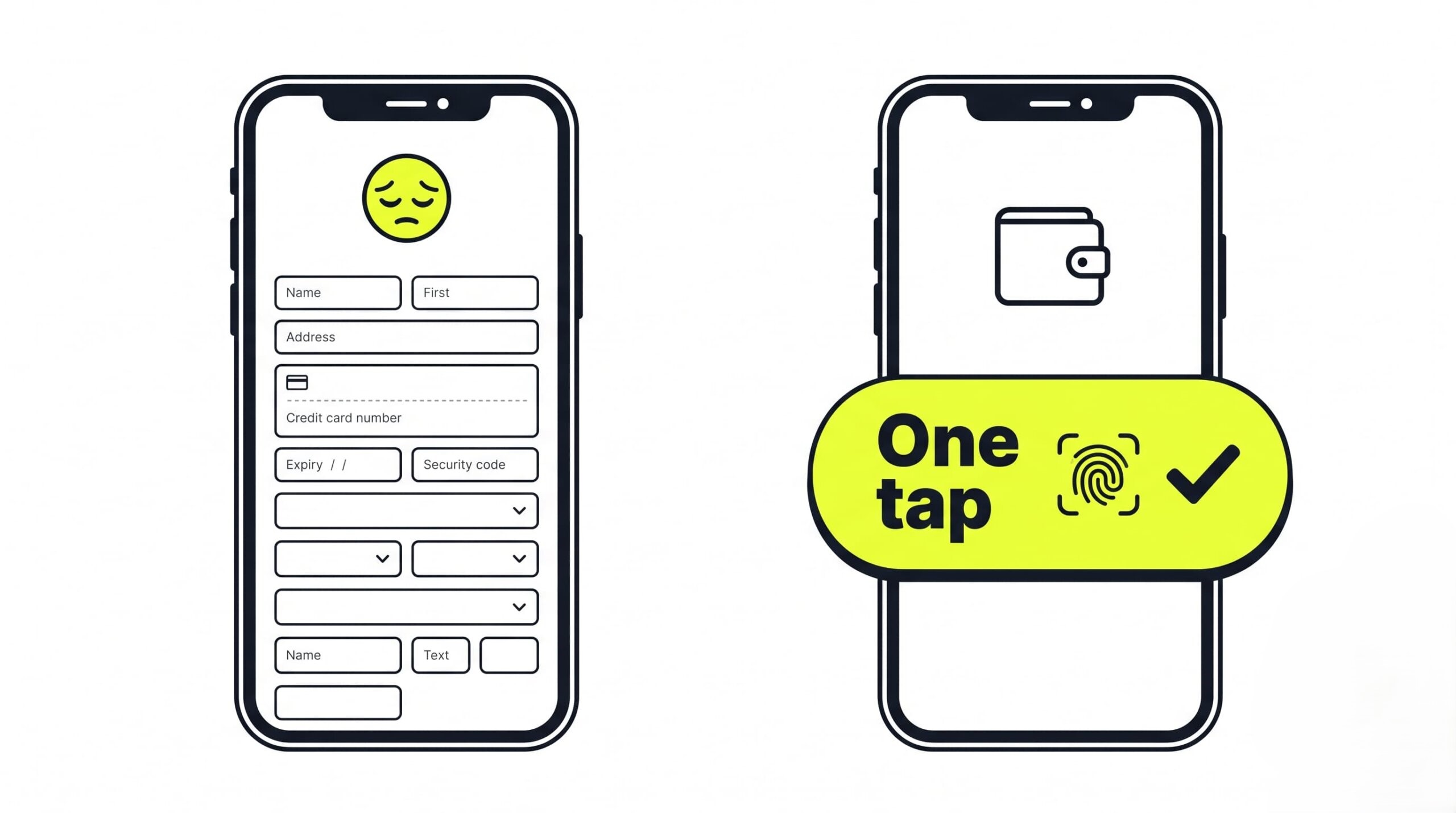
Express checkout lets a shopper pay with Face ID or Touch ID instead of typing card numbers on a phone keyboard. WooPayments (or Stripe) adds Apple Pay and Google Pay buttons directly to product, cart, and checkout pages, and WooPay stores payment details so returning buyers skip data entry entirely.

Picture the mobile reality: a shopper on a couch, phone in one hand, being asked to type a 16-digit card number, an expiration date, a CVC, and a full billing address. Autocorrect fights them the whole way.

Mobile express checkout with one-tap digital wallet compared to long WooCommerce card form


Digital wallets erase that entire sequence. With WooPayments or Stripe connected, an Apple Pay or Google Pay button appears for eligible devices — one tap, biometric confirmation, done. The buyer never touches the keyboard. Brands like Nutribullet and House of Malt have publicly reported conversion and average order value gains after enabling Apple Pay through WooPayments.

WooPay extends the effect to repeat purchases across the WooCommerce ecosystem: it saves the shopper’s payment and shipping details once, then recognizes them at any WooPay-enabled store, turning every future checkout into a returning-customer checkout.

Buy Now, Pay Later (BNPL): Affirm, Klarna, and Afterpay

BNPL services — Affirm, Klarna, Afterpay — split a purchase into installments at checkout, typically four interest-free payments. Reframing “$100” as “4 payments of $25” lowers the psychological price barrier and lifts conversion on higher-ticket items, though merchants should prepare for higher return rates from impulse purchases.

The mechanism is loss aversion. A $100 charge lands as a single painful loss; four $25 payments feel like four minor ones, even though the total is identical. For carts above the typical impulse threshold, that reframing is often the difference between “buy” and “maybe later.” BNPL usage spikes during holiday shopping seasons, when shoppers stretch budgets across many gifts at once.

Now the caveat most guides skip. BNPL cuts both ways. Payment plans that lower the barrier to buying also lower the barrier to buying carelessly — and impulse purchases come back. Merchants adding Klarna or Affirm should expect a higher return rate and staff their support and returns processing accordingly. Model the net effect: incremental revenue minus incremental returns and support cost. For most stores the math still favors BNPL, but go in with eyes open.

Social Proof, Photo Reviews, and Product Q&A

Star ratings alone no longer persuade — shoppers know fake and AI-generated reviews are everywhere. Customer-submitted photos and detailed written reviews carry the credibility stars have lost, while an interactive Q&A block (via a tool like Answerbase) resolves the specific doubts that keep buyers from clicking add-to-cart.

Skepticism is the default now. A wall of anonymous five-star ratings reads as noise, or worse, as manufactured. What still works is evidence that’s hard to fake: a customer’s own photo of the product on their kitchen counter, a review that mentions the specific problem it solved, a complaint the brand answered in public. Collect user-generated photos actively — post-purchase email requests with a small incentive work well.

Product Q&A closes the gap reviews can’t. A buyer stuck on “Will this fit a 15-inch laptop?” won’t email support; they’ll leave. A tool like Answerbase puts an interactive question-and-answer block on the PDP where past buyers and staff answer exactly those questions — and every answered question becomes permanent, indexable content that converts the next visitor with the same doubt.

Urgency, Cart Notices, and In-Cart Incentives

Urgency and in-cart incentives push hesitant shoppers to act now instead of “later” (which usually means never). Scheduled flash sales create honest deadlines, WooCommerce Cart Notices displays threshold messages like “Add $10 more for free shipping,” and points-based rewards programs retain customers without eroding margins through constant discounting.

Deadlines convert because open-ended decisions don’t. A scheduled sale with a real end date gives the shopper a legitimate reason to decide today. Keep it honest — a countdown timer that resets on refresh trains customers to distrust everything else on your site.

Cart notices turn the cart itself into a sales tool. The WooCommerce Cart Notices plugin shows contextual messages based on cart contents: “You’re $10 away from free shipping” reliably increases average order value, because the shopper adds an item to “save” on shipping.

For long-term retention, prefer points and rewards programs over recurring discounts. Points reward the behavior you want — repeat purchases — without teaching customers that your list price is negotiable.

Recovering Leaks: Automated Funnel Rescue Workflows

Nearly 70% of carts are abandoned before purchase. Automated funnel rescue in WooCommerce claws back that lost revenue with triggered abandoned-cart email sequences, exit-intent offers, and post-purchase reassurance flows — all running on autopilot once configured, recovering sales while your team does nothing.

Abandonment is not rejection. Shoppers abandon carts because a delivery arrived, a shipping cost surprised them, or they planned to finish on desktop and forgot. Their intent was real. Recovery automation simply re-opens the conversation at the right moment — and because the systems run on triggers, every recovered order is close to pure margin.

Recovering Abandoned Carts with Automated Emails and FunnelKit

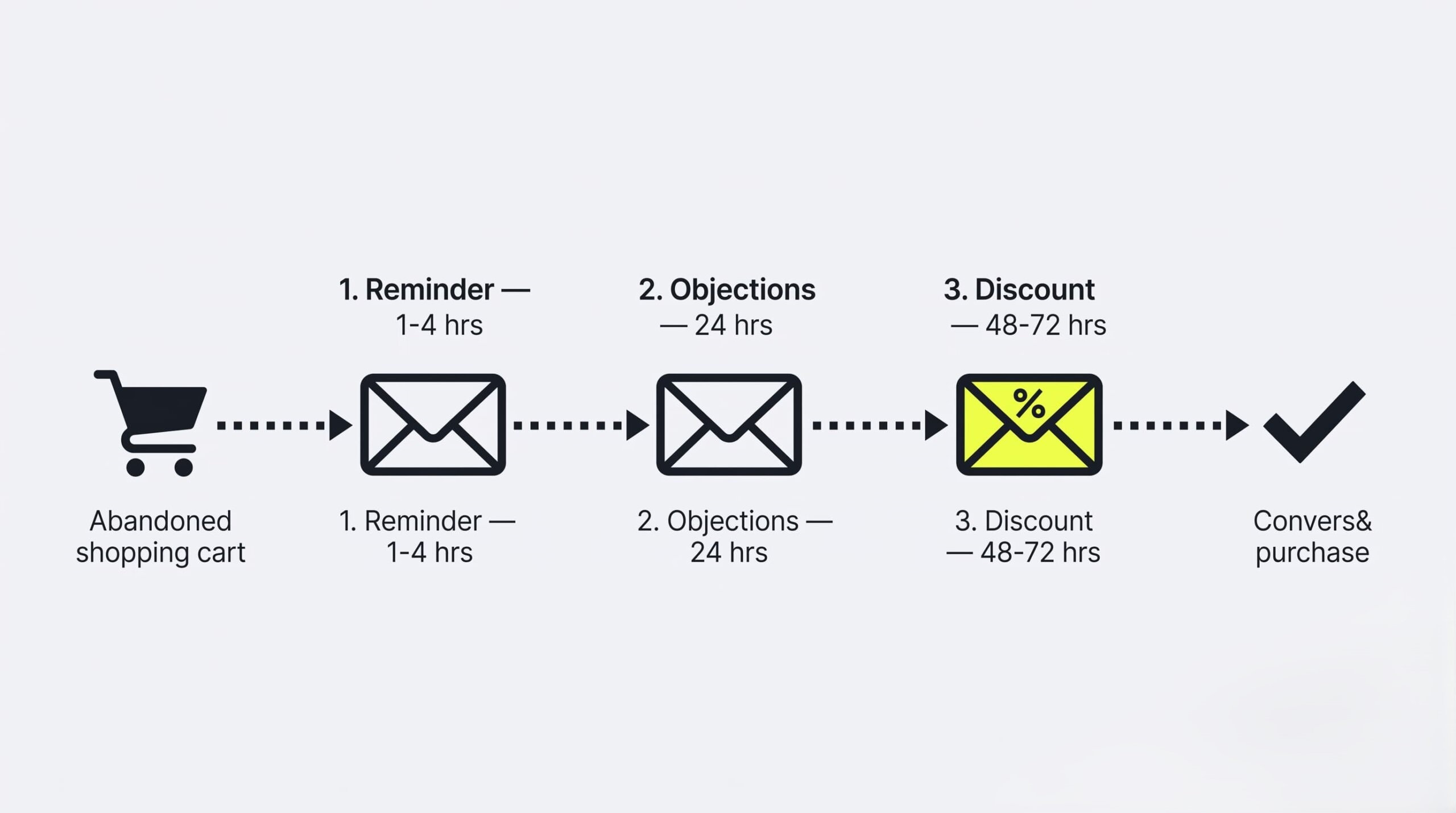
Abandoned-cart recovery uses a triggered email sequence — built in FunnelKit or Klaviyo — that fires when a shopper leaves without paying. The proven structure runs in three steps: a reminder showing the exact items, an objection-handling email (free shipping, guarantees), and a small discount as the final nudge.

FunnelKit (built for WooCommerce) or a Klaviyo integration captures the cart contents and the shopper’s email, then runs the sequence automatically.

bandoned cart recovery email timeline with reminder, objection and discount steps in WooCommerce

Structure it as escalation, not repetition:

  1. The reminder (1–4 hours after abandonment). Show the exact products with images and one link back to a pre-filled cart. No discount. Many shoppers simply got interrupted.
  2. The objection handler (24 hours). Address the likely blockers: free shipping threshold, return policy, warranty, or a standout review of the abandoned product.
  3. The final nudge (48–72 hours). A modest, expiring discount for the holdouts. Keep it small and last — offering it in email one trains customers to abandon carts on purpose.

Post-Purchase Reassurance and AI-Powered Protection

Post-purchase reassurance reduces the anxiety a buyer feels right after clicking “Place Order” — the moment buyer’s remorse and refund requests are born. Offering shipping protection or an extended warranty at checkout, through a cloud service like SureBright, builds confidence and adds margin with no logistics burden on the store.

Anxiety peaks after payment. The money is gone, the product hasn’t arrived, and the buyer starts wondering: What if it breaks? What if the package is stolen? Left unanswered, that anxiety becomes support tickets, chargebacks, and refund requests.

Product protection at checkout answers the anxiety before it forms. Services like SureBright add a one-click extended warranty or shipping protection option directly in the order flow. The buyer pays a small premium for peace of mind; the provider handles claims. The store carries no inventory, no logistics, no claims processing — and keeps a share of every protection plan sold as clean margin. Trust goes up. Profit goes up. Nothing ships.

The Testing Framework: Staging and A/B Testing on WooCommerce

A/B testing is what separates WooCommerce CRO from redecorating: every change gets validated against real traffic before it becomes permanent. The safe workflow builds each variant on an exact staging copy of the site, then tests one isolated element at a time — a headline, a CTA color, a review placement.

Everything in this guide is a hypothesis until your traffic confirms it. What lifted conversion 20% for one store may do nothing for yours — different audience, price point, product. Testing turns the tactics above into verified wins, and the same discipline applies to evaluating any of the WooCommerce tools for higher conversions covered in this guide:

WooCommerce Tools for Higher Conversions: Quick Comparison
Tool Category Conversion Job Where It Acts
WooCommerce Checkout Blocks Checkout (core) Fast React-based checkout, inline validation, mobile-first layout Checkout page
WooPayments + WooPay Payments Apple Pay / Google Pay one-tap checkout; saved payment details for repeat buyers Product, cart, checkout
Affirm / Klarna / Afterpay BNPL Installment payments that lower the price barrier on higher-ticket carts Checkout
FunnelKit Automation Abandoned-cart email sequences, upsells, post-purchase flows Email + funnel
WP Rocket / LiteSpeed Cache Performance Full-page caching to cut load times store-wide Every page
ShortPixel Performance WebP image compression for heavy product photography Product, category pages
Microsoft Clarity / Hotjar Analytics Heatmaps and session recordings that expose friction points Diagnosis (all pages)
Answerbase Product page Interactive Q&A blocks that resolve pre-purchase objections Product pages
SureBright Post-purchase Extended warranty / protection offers at checkout for trust and margin Checkout, post-purchase


Formulating Hypotheses and Isolating Variables

A valid test starts with a falsifiable hypothesis — “If we remove the required ‘Company Number’ field from checkout, checkout completion will rise 8%” — and changes exactly one variable per test. Build and validate each variant in a staging environment first, so experiments never break the live store.

Weak tests start with “let’s try a new checkout.” Strong tests follow a fixed grammar: If we change [one element], then [one metric] will move by [expected amount], because [reason grounded in data]. The structure forces you to name what you’re measuring before you measure it, so a result can’t be reinterpreted after the fact.

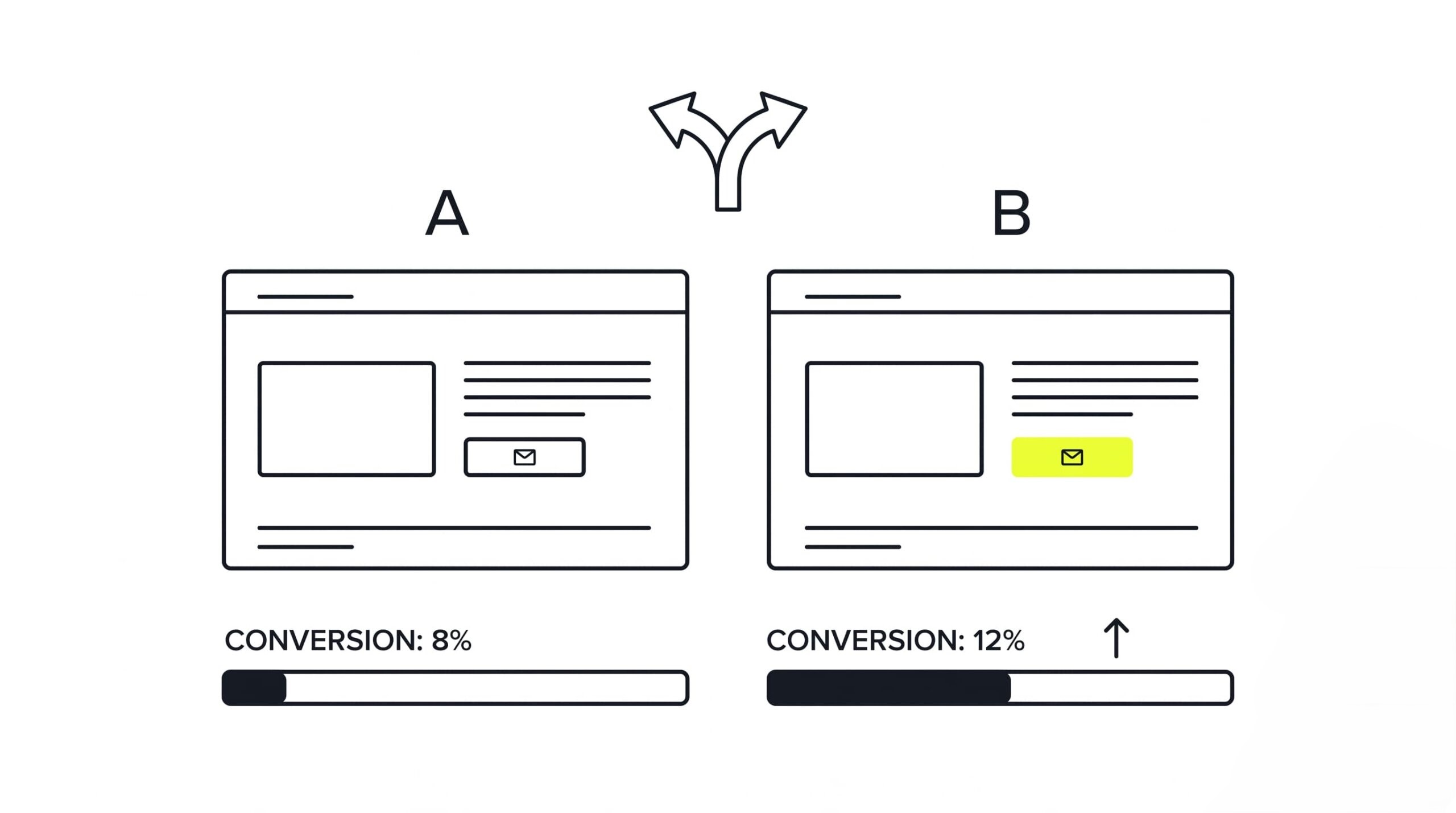
One variable per test. Change the button color and the headline together, and a winning variant tells you nothing — you can’t know which change did the work, or whether one helped while the other hurt. Isolation is slower. Isolation is also the only way the data means anything.

A/B test comparing two WooCommerce page variants with a single changed CTA button

Stage first, ship second. A broken experiment on a live checkout costs real orders and can corrupt real order data. Build variants on an exact staging copy of the site — managed hosts like Pressable offer one-click staging sync — verify the payment flow end to end, and only then run the split test on live traffic with a dedicated testing service. Test boldly. Break nothing.

WooCommerce CRO FAQ

Below are direct answers to the questions US store owners ask Google most often about WooCommerce CRO — conversion benchmarks, HPOS, guest checkout, GA4 tracking, and safe A/B testing.

What is a good WooCommerce conversion rate?

The average WooCommerce store converts between 2% and 4% of visitors. Anything above 4% is excellent. A rate below 1.5% signals serious problems — usually slow page loads, a broken mobile experience, or heavy checkout friction — and those technical issues should be fixed before any persuasion tactics.

How does HPOS improve WooCommerce conversion optimization?

HPOS (High-Performance Order Storage) moves order data into dedicated database tables instead of the shared WordPress posts tables. Per WooCommerce’s benchmarks, order creation runs up to 5x faster and checkout loads about 1.5x faster — a direct WooCommerce conversion optimization gain, since fewer shoppers abandon a fast checkout.

What are the best WooCommerce tools for higher conversions?

The strongest WooCommerce tools for higher conversions are Checkout Blocks for a fast React-based checkout, WooPayments for Apple Pay and Google Pay wallets, FunnelKit for abandoned-cart automation and upsells, and Microsoft Clarity for the heatmaps and session recordings that show you what to fix first.

Should I require customer accounts during WooCommerce checkout?

No. Forced account creation is one of the most common reasons shoppers abandon a purchase. Enable Guest Checkout under WooCommerce → Settings → Accounts & Privacy, and invite the customer to set a password on the thank-you page — after the order is complete, when there’s nothing left to lose.

How do I track cart abandonment in WooCommerce using GA4?

Install a connector like the WooCommerce Google Analytics Integration plugin, which automatically sends add_to_cart, begin_checkout, and purchase events to GA4. Then build a Funnel Exploration report in GA4 with those events as steps to see the exact drop-off rate at each stage of checkout.

Is A/B testing safe on a live WooCommerce site?

Testing directly on production carries real risk: payment gateway failures, plugin conflicts, and corrupted order data. The safe pattern is to build and validate every test scenario in a staging environment first, then run the confirmed variants on live traffic through a dedicated split-testing service.

Stop Losing Sales at Checkout

Download our free 18-point WooCommerce CRO Checklist to find and patch the leaks in your store’s checkout funnel.

"*" indicates required fields

What can we help you with?

Recommended for You

Read more expert guides, case studies, and platform reviews handpicked to help you scale your online store.

Illustration showing how to fix the color schemes must be defined error in Shopify Dawn theme customizerEcommerce
August 21, 2026
How to Fix Color Schemes Must Be Defined
Fix the "color schemes must be defined in settings_data" error in Shopify Dawn (v11+). Learn 3 quick ways to restore your JSON presets and unblock the theme cus...
Read More
Illustration of filtering automated Council Bluffs bot traffic out of Shopify store analyticsEcommerce
August 17, 2026
What is Council Bluffs Shopify Traffic
Seeing traffic spikes from Council Bluffs, Iowa on Shopify? Discover what causes this automated bot traffic and how to filter it out in GA4 and Shopify Analytic...
Read More
WooCommerce conversion rate optimization funnel showing discover, choose and purchase stagesEcommerce
August 10, 2026
WooCommerce Conversion Rate Optimization
WooCommerce conversion rate optimization is a data-driven framework for finding the exact points where shoppers give up — slow pages, cluttered checkouts, missing...
Read More
Woocommerce vs shopify comparison 2026 — platform overview illustrationEcommerce
August 4, 2026
WooCommerce vs Shopify
WooCommerce vs Shopify remains the platform decision that defines long-term costs and development flexibility for US merchants in 2026. Shopify sells speed and ...
Read More
Cloud ecommerce platform connecting storefront, payments, and analytics — illustrationEcommerce
July 27, 2026
What Is a Cloud eCommerce Platform
Aging on-premises servers slow every product launch, drain IT budgets, and buckle under Black Friday traffic. A cloud ecommerce platform removes that bottleneck:...
Read More
Best ecommerce site builders for online stores comparison 2026Ecommerce
July 21, 2026
Best eCommerce Site Builders for Online Stores
The best ecommerce site builders let small businesses launch an online store, accept payments, and manage shipping from a single dashboard — no developer requir...
Read More